Exercise Bikes
Exercise Bike With Moving Arms: Types, Benefits and What to Buy
Exercise bikes with moving arms explained: air bikes, dual-action uprights, recumbent cross trainers and desk pedallers, what the research says and who each one suits.

By Paul Kendrick, Cardio & Endurance Editor · Updated 30 October 2026
An exercise bike with a screen is worth buying when you'll actually ride the classes or virtual routes it shows, and when a built-in display suits you better than propping up your own tablet. That second condition knocks out more people than you'd expect. The screen is usually the most expensive part of the package, often the part that ties you to a monthly fee, and the part most likely to feel dated in five years, while the flywheel and frame underneath will carry on fine.
So before you pick a bike, pick a screen type. There are three, and they suit very different buyers.
Almost every exercise bike has one of these: a small monochrome or backlit display showing time, speed, distance, an estimated calorie count and, if the bike has grip sensors or a chest strap, heart rate. It doesn't play classes or video. Expect these on bikes from about £150 to £400.
People dismiss the LCD console, but it does the one job a training screen has to do, which is tell you how hard you're working. Pair it with a TV in front of the bike and you have the classic home cardio setup, which is fine if you train to music or box sets rather than an instructor. The weak spot is accuracy: calorie and distance numbers on budget consoles are estimates from a generic formula, so use them to compare one session with the next rather than as hard figures.
Many mid-range bikes swap the big console for a cradle that holds your phone or tablet, sometimes alongside a small LCD. The bike connects over Bluetooth to a companion app or to third-party platforms such as Zwift, Kinomap and the Peloton App. This is the route we'd point most people towards, because you're not paying again for a screen you already own, the apps update on the device rather than relying on a bike maker's firmware, and you can take the tablet to the sofa afterwards.
What you lose is neatness. A tablet holder can wobble on cheaper bikes, a 10in screen is small for floor classes, and you have to keep the device charged.
This is the Peloton model, now copied at lower prices. The bike has its own internet-connected touchscreen and runs its maker's class software directly. The standard Peloton Bike uses a 21.5in Full HD touchscreen that swivels through 360 degrees, and the Peloton Bike+ steps up to a 23.8in swivelling screen with auto resistance that follows the instructor's calls.
At the cheaper end, MERACH sells a recumbent with a 15.6in full HD panel that tilts and rotates. In our MERACH 15.6in screen recumbent review we found the screen itself genuinely useful, but the bike underneath only has eight resistance levels, and the listing's own small print says phone mirroring doesn't currently work with iPhone 17 models or Google phones. That's the pattern across budget screen bikes: the display grabs your attention in the photos while the resistance and frame quietly get cheaper to pay for it.
A built-in screen often comes with an ongoing bill, and that changes the maths more than the sticker price does.
At the time of writing, Peloton's UK site lists the All-Access Membership at £45 a month, which is what you need to unlock classes on a Peloton Bike or Bike+. That's £540 a year, or £1,620 over three years, before you've paid for the bike. Without the membership, a Peloton is a very expensive spin bike with a basic metrics display. Peloton also lists two app-only tiers for riders on other bikes: App One at £12.99 a month (strength, yoga and other non-equipment classes, plus 3 equipment cardio classes a month) and App+ at £28.99 a month for unlimited cardio classes on any bike.
We run the full one-year and three-year numbers, including refurbished and rental options, in Is Peloton worth it?, and the conclusion there is blunt: the membership is part of the price, so if you can't see yourself paying it for two or three years, buy a cheaper bike.
Third-party platforms charge too. Zwift and Kinomap are paid subscriptions with free trials, and prices change often enough that you should check their current UK rates before you budget. A handful of bike brands, including Renpho and Sunny Health & Fitness, offer their own apps free, which makes a real difference over three years.
Check the small print on 'free' screens
Some bikes advertise a smart screen and a "free app", then gate most of the class library behind a premium tier once the trial ends. Before buying, look for the app's name on the listing, then check its pricing page directly rather than trusting the bike listing.
If you own an iPad or Android tablet of 10in or more, this is the cheapest way to get a proper screen experience. You need three things from the bike.
Zwift turns your ride into a game on virtual roads, with group rides and races. Kinomap plays real-world route videos that move with your speed, which suits people who'd rather look at the Alps than a cartoon avatar.
Does all this screen time make you exercise more? There's some evidence it makes riding feel better. In a small pilot study of 12 college students, a 20-minute session on a virtual reality exercise bike felt easier and more enjoyable than the same time on a standard stationary bike, with no difference in blood pressure response (Zeng et al., 2017). A 2024 crossover trial of 31 adults found virtual and enhanced reality indoor cycling raised engagement, but outdoor riding still beat both on enjoyment and motivation (Poli et al., 2024). So a screen can make indoor riding more bearable. It won't make it better than a ride outside, and it can't do the turning up for you.
On a bike, the screen sits roughly 60cm to 80cm from your eyes. A 10in to 13in display is enough to follow a class from the saddle. You only need 15.6in or more when you want to read it from further away, follow floor classes, or you simply struggle with small text.
If you'll do strength, yoga or stretching sessions off the bike, a swivelling screen matters more than raw size. Both current Peloton bikes swivel 360 degrees. Cheaper built-in screens often tilt but turn through a narrower range, so check the quoted angles.
Magnetic resistance is quieter and smoother than friction pads, and it's what you want in a flat or a shared house. Then decide between manual resistance (you turn the knob) and auto resistance (the app or instructor sets it). Auto resistance costs more but is the feature that makes Zwift and guided classes feel properly connected.
A built-in screen is only as good as the maker's software updates. Peloton has a large user base and an ongoing incentive to keep its screens working. A small brand selling a screen bike on Amazon may not, and a dead app turns that screen into an expensive ornament. That risk is the strongest argument for the tablet route.
Prices move constantly, so treat these as rough bands rather than quotes.
The biggest one is paying for a screen to motivate yourself and then never using its classes. If you mostly watch TV while you ride, an LCD bike in front of the TV is the right buy, and the extra £300 or more is wasted.
Another is ignoring the bike under the screen. Eight resistance levels, a light flywheel or a 100kg user limit are still limitations whatever display is bolted on. Read the specs as if the screen weren't there, then decide whether it's worth the premium.
And people forget to cost the subscription over the years they'll own the bike. A cheaper screen bike with a £30 monthly app can end up costing more than a pricier bike with a free one.
Whatever screen you choose, the NHS recommends adults get at least 150 minutes of moderate activity or 75 minutes of vigorous activity a week, plus strength work on two days (NHS physical activity guidelines for adults). Five 30-minute rides at a pace where you can talk but not sing covers it. If a screen is what gets you on the bike for those sessions, it has earned its money.
Only if you'll use the classes or routes it was built for, and you'd rather not manage a tablet. A built-in HD screen adds roughly £150 to £1,000 to the price of the bike underneath it, and the premium versions lock most of their content behind a monthly membership. If you already own a 10in or larger tablet, a cheaper bike with a good holder gets you most of the same experience.
Peloton's All-Access Membership, which you need to unlock classes on the Peloton Bike and Bike+, costs £45 a month on onepeloton.co.uk at the time of writing. If you ride a non-Peloton bike, the Peloton App+ tier (unlimited cardio classes) is £28.99 a month and App One is £12.99 a month, though App One limits you to 3 equipment cardio classes a month.
Usually not on the built-in screen itself, because most built-in displays run the manufacturer's own software. Zwift runs on your own phone, tablet, laptop or Apple TV, and the bike needs to broadcast its data over Bluetooth (ideally the FTMS standard) for Zwift to read it. Bikes like the Renpho AI Smart Bike go further and let Zwift control the resistance automatically.
It depends on the bike. Some cheaper screen bikes, like MERACH's 15.6in recumbent, mirror your phone so you can show whatever is playing on it. Peloton's screens are built for Peloton content, and you shouldn't buy one assuming full access to streaming apps. The simplest route to Netflix while riding is a tablet on a holder, or a bike positioned in front of the TV.
For following classes from the saddle, 10in to 13in is plenty, since the screen sits about an arm's length away. Bigger panels (15.6in to 23.8in) start to matter when you want to step off the bike and follow a floor class, or when your eyesight makes small text a strain. A screen that swivels is worth more than a few extra inches if you plan to do mat work.
Exercise bikes with moving arms explained: air bikes, dual-action uprights, recumbent cross trainers and desk pedallers, what the research says and who each one suits.
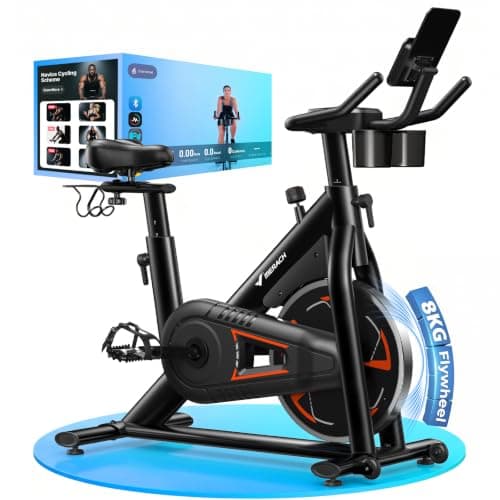
Our MERACH H-Frame exercise bike review: 8kg flywheel, 8 magnetic levels, 150kg limit, apps and Zwift support, and who should buy it at around £260.
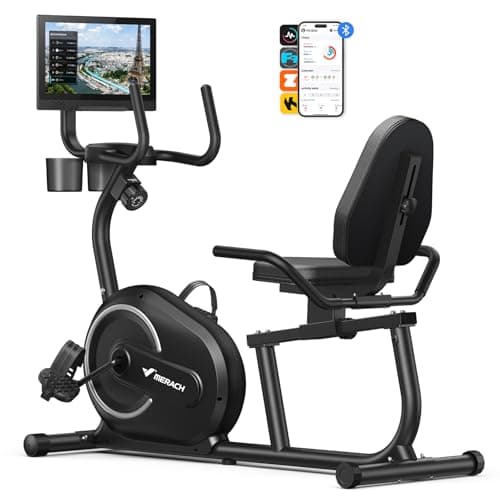
An honest review of the MERACH recumbent exercise bike with a 15.6in HD rotating screen: screen mirroring caveats, 8 resistance levels, fit range and how it compares with cheaper recumbents.
The real benefits of a recumbent bike, from back support and low joint load to easy mounting, plus honest trade-offs, calorie estimates and how to set one up.
Best Exercise is a participant in the Amazon EU Associates Programme, an affiliate advertising programme designed to provide a means for sites to earn advertising fees by advertising and linking to Amazon.co.uk. As an Amazon Associate we earn from qualifying purchases. This comes at no extra cost to you and never influences our independent reviews or rankings.